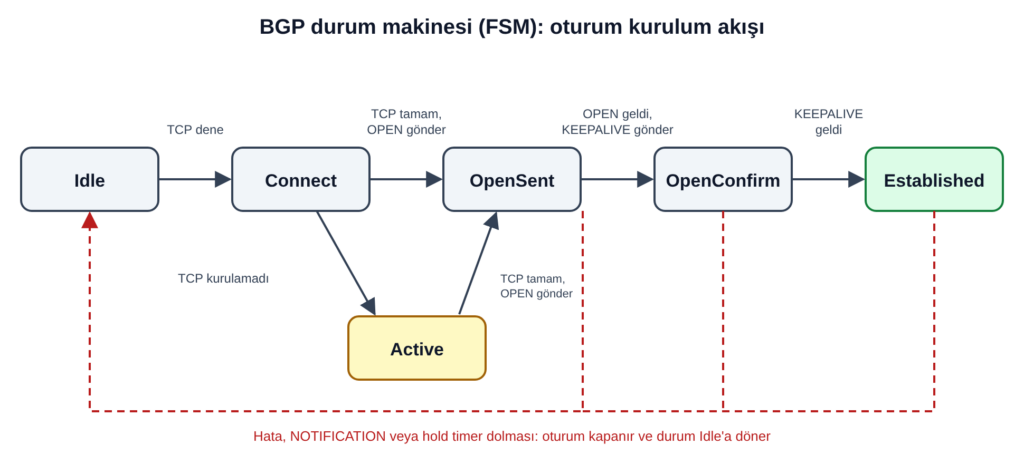
BGP, TCP 179 portu üzerinde çalışır. Önce iki router arasında bir TCP bağlantısı kurulur, sonra taraflar birbirine OPEN mesajı yollar, ardından KEEPALIVE ile karşılıklı onay verir. Bundan sonra UPDATE mesajlarıyla route bilgisi akmaya başlar. FSM (finite state machine), bu sırayı altı duruma böler:
Idle: Hiçbir şey denenmiyor. Başlangıç durumu, bir hatadan sonra dönülen yer de burası.
Active: TCP bağlantısı henüz yok, router bağlantı kurmaya çalışıyor ve karşıdan gelecek bağlantıyı da dinliyor.
OpenSent: TCP tamam, OPEN mesajımızı gönderdik, karşının OPEN’ını bekliyoruz.
OpenConfirm: Karşının OPEN’ı geldi ve kabul edildi, şimdi KEEPALIVE bekliyoruz.
Established: Oturum açık. UPDATE ve KEEPALIVE trafiği akıyor.
Sorunsuz bir kurulumda sıra şöyle ilerler: Idle, Connect, OpenSent, OpenConfirm, Established.
Active, TCP bağlantısı ilk denemede kurulamadığında devreye giren yan yoldur. Bu yüzden Active görmek genelde iyiye işaret değildir.
BGP oturum kurulum akışı. Kesikli çizgiler hata durumunda Idle’a dönüşü gösterir.
“Active” adı aldatıyor
Yeni başlayan biri Active görünce komşuluğun aktif olduğunu düşünebilir. Oysa tam tersi: router karşıya ulaşamıyor, tekrar tekrar deniyor. Bir komşu uzun süre Connect ile Active arasında gidip geliyorsa sorun çoğu zaman TCP katmanındadır. BGP ayarlarına bakmadan önce şunları kontrol etmek gerekir:
Komşu IP’sine yönlendirme tablosunda rota var mı? Loopback üzerinden kuruyorsanız IGP ya da statik rota gerçekten karşının loopback’ini getiriyor mu?
Ping çalışıyor mu? Kaynak adres, karşı tarafın beklediği adresle aynı mı? (Huawei’de peer ... connect-interface, Nokia’da local-address ile ayarlanır.)
Arada 179 numaralı TCP portunu kesen bir ACL veya güvenlik duvarı var mı?
eBGP komşusu doğrudan bağlı değilse TTL tarafını düşünün. eBGP paketleri çoğu uygulamada TTL 1 ile gider; birkaç atlama ötedeki komşu için multihop türü bir ayar gerekir.
MD5 kimlik doğrulaması varsa iki tarafta da aynı anahtar mı? Anahtar uyuşmazsa TCP oturumu kurulamaz ve komşu Active/Connect arasında kalır. Log’da MD5 ile ilgili bir uyarı aramak iyi bir fikirdir.
Idle: hiç denemiyor ya da bırakmış
Idle, ilk açılışta kısa süre görünebilir. Uzun süre orada kalıyorsa genelde şunlardan biri vardır:
Komşu yönetimsel olarak kapatılmış (shutdown ile kapatılmış ya da komşu tanımı silinmiş olabilir).
Komşuya giden rota yok, yani router bağlantıyı başlatamıyor.
Önceki bir hata nedeniyle oturum düşmüş ve router yeniden denemeden önce bekliyor.
OpenSent’te takılmak
Bu noktada TCP kurulmuş demektir. Yani yol açık, ağ sorunu büyük ihtimalle değil. Router OPEN mesajını göndermiş, karşıdan OPEN bekliyor. Uzun süre burada kalıyorsa:
Karşı taraf bizi komşu olarak tanımlamamıştır (bizim IP adresimiz onun tarafında tanımlı değildir).
OPEN mesajındaki bir değer karşıda kabul görmemiştir; karşı taraf NOTIFICATION gönderip bağlantıyı kapatmış, biz de sürekli Idle, Connect, OpenSent döngüsüne girmişizdir.
İkinci durumda oturum sürekli düşüp kalkar. Çözüm, hangi NOTIFICATION’ın geldiğine bakmaktır. Aşağıdaki tablo bunun için.
OpenConfirm de hızlı geçilmeli
OpenConfirm’de kalan bir oturum nadirdir. Orada takılıyorsa ya KEEPALIVE’lar bir yönde kayboluyordur ya da karşı taraf zamanlayıcı uyuşmazlığı nedeniyle oturumu kapatıyordur. İki tarafta da hold time değerlerine bakın.
Zamanlayıcılar: hold time ve keepalive
İki router, OPEN mesajında kendi hold time değerlerini gönderir; oturum için küçük olan değer kullanılır. RFC 4271’e göre hold time ya sıfır olmalı ya da en az 3 saniye olmalı. KEEPALIVE aralığı için önerilen değer hold time’ın üçte biridir ve saniyede birden sık gönderilmemelidir. Hold time sıfırsa periyodik KEEPALIVE gönderilmez.
Varsayılan değerler üreticiye ve yazılım sürümüne göre değişebilir. Kendi cihazınızdaki değere komşu ayrıntı çıktısından bakmak en güvenlisidir.
Hold time içinde hiç KEEPALIVE ya da UPDATE gelmezse router “Hold Timer Expired” NOTIFICATION’ı gönderip oturumu kapatır. Hat kaybı, tek yönlü paket kaybı ya da cihazın yoğun yük altında olması bu tür düşmelere yol açabilir.
NOTIFICATION kodları: oturum neden kapandı?
Bir oturum hata nedeniyle kapanırken karşıya NOTIFICATION mesajı gider. Bu mesajdaki hata kodu, arıza aramanın en kısa yoludur:
Kod
Anlamı
Ne zaman görürsünüz
1
Message Header Error
Bozuk mesaj başlığı
2
OPEN Message Error
OPEN içindeki bir parametre kabul edilmedi
3
UPDATE Message Error
UPDATE içeriğinde hata
4
Hold Timer Expired
Süre içinde KEEPALIVE ya da UPDATE gelmedi
5
Finite State Machine Error
Mevcut duruma uymayan bir mesaj geldi
6
Cease
Oturum yönetimsel olarak ya da bir limit nedeniyle kapatıldı
Kod 2 (OPEN Message Error) için alt kodlar özellikle işe yarar:
1: Desteklenmeyen sürüm numarası
2: Bad Peer AS. Karşının AS numarası, bizim tarafta tanımlı komşu AS numarasıyla uyuşmuyor.
3: Bad BGP Identifier. Router-id değeri geçersiz.
4: Desteklenmeyen opsiyonel parametre
6: Kabul edilemeyen hold time
Yeni kurulan bir eBGP komşuluğunda en sık rastlanan hatalardan biri “Bad Peer AS”tir. İki tarafın birbirinin AS numarasını yanlış yazması çok basit bir hatadır ama kolayca gözden kaçar.
Huawei VRP’de komşuların durumunu görmek için:
display bgp peer
Nokia SR OS’ta:
show router bgp summary
show router bgp neighbor <ip> detail
Her iki üreticide de durum Established değilse önce komşunun ayrıntı çıktısına ve cihaz loglarına bakın. Oturumun neden kapandığına dair bilgi çoğunlukla orada bulunur.
Komşu Established olmuyorsa şu sırayla ilerlemek zaman kazandırır:
Durum Idle ise: komşu yönetimsel olarak kapalı mı, komşuya rota var mı?
Durum Connect ya da Active ise: ping, kaynak adres, 179. port, ACL, TTL, MD5.
Durum OpenSent ile Idle arasında gidip geliyorsa: AS numarası, router-id, hold time. NOTIFICATION kodunu bulun.
Established olduktan sonra düşüyorsa: hold timer, cihaz yükü, hat kalitesi, prefix limitleri.
Oturum açık ama route gelmiyorsa: artık FSM değil politika meselesidir. Import ve export politikalarına bakın.
wsl üzerinde çalıştırdğınız bir uygulamaya ana makinenizin bağlı olduğu ağdan erişmek istiyorsanız , ip değişimlerinde her seferinde port erişim izinleri vb ile uğraşmak istemiyorsanız wsl in “mirrored networking” moduna geçirilmesi doğru bir tercih olabilir..
bunun için
C:\Users\kullanıcı_adi
dizini altında
.wslconfig
isimli bir dosya oluşturuyoruz ve
[wsl2]
networkingMode=mirrored
firewall=true
satırlarını ekliyoruz. bundan sonra değişikliklerin geçerli olması için wsl yeniden başlatmanız gerekmektedir.
nokia routerlar üzerinde aynı dakikalar içerisinde up/down olan portları bulmak için loglara bakmak en doğru yöntem olsada arayüzlerin last state change larından buna bakabiliriz. aşagıdaki basit komut işimize yarayacaktır.
A:router_a# environment no more
A:router_a# show port detail | match expression "02/26/2026 12:2|Interface"


Interface          : esat-1/1/1                 Oper Speed       : 0 Mbps
Last State Change  : 11/18/2025 01:20:11        Hold time down   : 0 seconds

Interface          : esat-1/1/2                 Oper Speed       : 1 Gbps
Last State Change  : 02/26/2026 12:28:36        Hold time down   : 0 seconds

Interface          : esat-1/1/3                 Oper Speed       : 1 Gbps
Last State Change  : 02/10/2026 04:16:28        Hold time down   : 0 seconds

Interface          : esat-1/1/4                 Oper Speed       : 1 Gbps
Last State Change  : 02/26/2026 12:28:37        Hold time down   : 0 seconds

Interface          : esat-1/1/5                 Oper Speed       : 1 Gbps
Last State Change  : 02/26/2026 12:28:38        Hold time down   : 0 seconds

Interface          : esat-1/1/6                 Oper Speed       : 1 Gbps
Last State Change  : 02/26/2026 12:28:37        Hold time down   : 0 seconds

Interface          : esat-1/1/7                 Oper Speed       : 1 Gbps
Last State Change  : 02/26/2026 12:28:37        Hold time down   : 0 seconds

Interface          : esat-1/1/8                 Oper Speed       : 1 Gbps
Last State Change  : 02/26/2026 12:28:36        Hold time down   : 0 seconds
nokia routerlarda toplu olarak sdp oluşturma ihtiyacı olurşursa aşağıdaki formatta bir excel dosyası oluşturup
sdpid
routera
routerb
routerbip
10093
router_a
routerb_b
10.10.10.1
4806
router_a
routerb_d
10.10.10.3
1078
router_a
routerb_f
10.10.10.5
aşagıdaki python kodu kullanarak oluşturduğumuz jinja formatına uygun kodları üretebiliriz… oluşturulacak routerda sdpid nin var olmaması gerekmektedir.
import pandas as pd
from jinja2 import Environment, FileSystemLoader

# Excel dosyasını oku
df = pd.read_excel('sdp_create.xlsx')

# Jinja2 ortamını ayarla (şablon dosyası ile aynı dizinde çalıştığını varsayıyoruz)
env = Environment(loader=FileSystemLoader('.'))
template = env.get_template('sdp_create_template.j2')

# Excel'den okunan veriyi listeye çevir
data = df.to_dict(orient='records')

# Jinja2 ile konfigürasyon dosyasını oluştur
output = template.render(items=data)

# Sonucu dosyaya yaz
with open('sdp_create_config.txt', 'w', encoding='utf-8') as f:
    f.write(output)
sdp_create_template.j2 dosyasında sdp mpls olarak oluşturulup ldp yi aktif ettiğimiz bir örnek var.
{% for item in items %}
/configure service sdp {{ item.sdpid }}  mpls create
info
description "to_{{ item.routerb }} "
far-end {{ item.routerbip }}
ldp
path-mtu 2000
keep-alive
    shutdown
exit
no shutdown

{% endfor %}
NDT, Measurement Lab (M‑Lab) tarafından geliştirilen açık kaynaklı bir ağ performans testi aracıdır; upload, download ve gecikme gibi parametreleri ölçer M‑Lab NDT verileri açık şekilde Google Cloud Storage ve BigQuery üzerinden erişilebilir hâldedir.. Kullanılan M-Lab’in https://speed.measurementlab.net adresinden test yapabilmektedir.
Test sonuçlarının Türkiye verilerini incelemek amacıyla Google Cloud Console üzerinden veri çekmeye yönelik bir kod geliştirme ihtiyacı doğmuştur. Mevcut yöntemlerle veri alımı mümkün olsa da, Türkiye’de M-Lab servisi yaygın olarak kullanılmadığı için elde edilen veri setleri sınırlı ve temsil edici olmamaktadır.
nokia routerda belirli bir servis altındaki sapları silme ihtiyacı durumunda aşagıdaki kod kulllanılabilir.
import pandas as pd
from jinja2 import Environment, FileSystemLoader

# Excel dosyasını oku
df = pd.read_excel('sap_delete.xlsx')

# Jinja2 ortamını ayarla (şablon dosyası ile aynı dizinde çalıştığını varsayıyoruz)
env = Environment(loader=FileSystemLoader('.'))
template = env.get_template('sap_delete_template.j2')

# Excel'den okunan veriyi listeye çevir
data = df.to_dict(orient='records')

# Jinja2 ile konfigürasyon dosyasını oluştur
output = template.render(items=data)

# Sonucu dosyaya yaz
with open('sap_delete_config.txt', 'w', encoding='utf-8') as f:
    f.write(output)
üretilecek komut için aşagıdaki jinja template ini kullanyoruz..
{% for item in items %}
/configure service vpls {{ item.SvcId }} sap {{ item.PortId }} shutdown
/configure service vpls {{ item.SvcId }} no sap {{ item.PortId }}
{% endfor %}
sap_delete_config.txt dosyasında tempalte sonucuna uygun konfigürasyon oluşmuş olacaktır..
kullanacağımız excel ise show service sap-using komutunun çıktısına uygun olarak aşagıdaki formatta olmaldıır..
PortId
SvcId
Ingress
Ing.
Egress
Egr.
Adm
Opr
lag-40:1011.0
1234
54
none
45
none
Up
Down
lag-42:1011.0
1234
54
none
45
none
Up
Down
lag-44:1011.0
1234
54
none
45
none
Up
Down
Gerekli kodları aşagdaıki github adresinden ulaşılabilir.
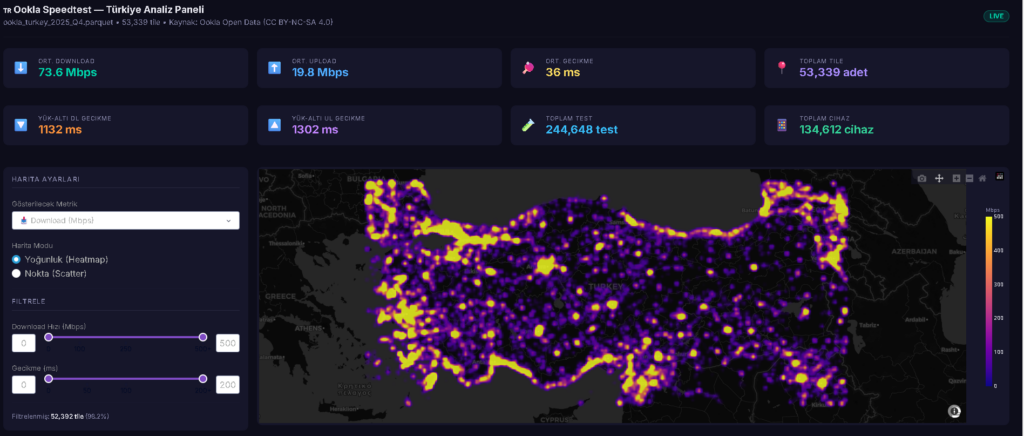
5g olaylarından dolayı hız testleri gündemde. bilinen ve doğru sonuç veren çok fazla hız testi sayfası yok. neredeyse hiç birinin açık verisi bulunmuyor. ookla nın çeyrek halinde yayınlandığı veriler bulunuyor ancak bu veriler çok kısıtlı.. örnek olarak operatör bilgisi bulunmuyor. bilr bölge için genel hız testi sonuçlarını incelemeye yardımcı olabiliryor.. açık veriler yılın çevrekleri şeklinde yayınlanıyor.
dosyalar belirli bir yapıya göre yayınlanıyor. en son yayınlanan çevrek verilerine göre türkiye verilerini indirecek bir python kod yazalım. verilerde doğrudan ülke bilgisi bulunmuyor. türkiyeyi içine alan koordinat bilgilerini kullanacağız. dikdörtgen şeklinde bir veri çekeceğimiz için sınırımızda diğer ülke verileride içinde yer alıyor.
ping sonucuna bakınca durumu daha net anlayacaksınız.
ping google.com

Pinging google.com [192.178.24.14] with 32 bytes of data:
Reply from 192.178.24.14: bytes=32 time=60ms TTL=112
Reply from 192.178.24.14: bytes=32 time=59ms TTL=112
Reply from 192.178.24.14: bytes=32 time=58ms TTL=112
Reply from 192.178.24.14: bytes=32 time=63ms TTL=112

Ping statistics for 192.178.24.14:
    Packets: Sent = 4, Received = 4, Lost = 0 (0% loss),
Approximate round trip times in milli-seconds:
    Minimum = 58ms, Maximum = 63ms, Average = 60ms
ping -6 google.com

Pinging google.com [2a00:aaaa:aaaa:820::aaaa] with 32 bytes of data:
Reply from 2a00:aaaa:aaaa:820::aaaa: time=39ms
Reply from 2a00:aaaa:aaaa:820::aaaa: time=37ms
Reply from 2a00:aaaa:aaaa:820::aaaa: time=38ms
Reply from 2a00:aaaa:aaaa:820::aaaa: time=38ms

Ping statistics for 2a00:1450:4017:820::200e:
    Packets: Sent = 4, Received = 4, Lost = 0 (0% loss),
Approximate round trip times in milli-seconds:
    Minimum = 37ms, Maximum = 39ms, Average = 38ms